

 InfoFeaturesMenu OptionsRequirements
NOTE: not all of these requirements are required, only install the resources that you need. If you are using QBCore or ESX frameworks then you will not need any Discord Permission resources or NativeUI for the menu - unless you want to use those options!
If you are confused about which files you need, please refer to the Installation Guide and Customization Guide found below!
[discordroles 1] : Discord permission checking
[hqly_perms] : wrapper for discordroles
| [OkOkNotify] | [VCore-Noti 2] | [T-Notify 1] | [skeexsNotify 1] | [Infinity Notify 1] | [B-Notify 1] | [Atom-Notify 1] |
| [Mythic Notify 1] | ||||||
| [QBCore 5] | Built-in QBCore notification system | |||||
| [ESX 1] | Built-in ESX notification system |
Installation Guidehqly_baitcar_v2 into your resources folderfxmanifest.lua and uncomment line #25: '@NativeUI/NativeUI.lua',config.luamenuType to nativeuinotificationFramework to gtavpermissionType to either ace, command, or noneitemFrameWork to nonerequireItem is set to falsehqly_baitcar_v2 into your resources folderfxmanifest.lua and comment line #25: '@NativeUI/NativeUI.lua',config.luamenuType to qbcorenotificationFramework to qbcorepermissionType to either qbcore, ace, command, or noneitemFrameWork to qbcorerequireItem is set to falseallowedRoles and put any job names you wish to be able to open the menuIf you wish to require an item to use with the bait-car:
baitcar.png into qb-inventory/html/imagesconfig.luarequireItem is set to truebaitcar_trackerhqly_baitcar_v2 into your resources folderfxmanifest.lua and comment line #25: '@NativeUI/NativeUI.lua',config.luamenuType to esxnotificationFramework to esxpermissionType to either esx, ace, command, or noneitemFrameWork to esxrequireItem is set to falseallowedRoles and put any job names you wish to be able to open the menuIf you wish to require an item to use with the bait-car:
hqly_baitcar.sql on your SQL server, replacing DBNAME with the database associated with your ESX serverconfig.luarequireItem is set to truebaitcar_trackerconfig.luapermissionType to aceserver.cfg add the appropriate ace permissions.discordroles and hqly_perms: refer to Requirements section found aboveconfig.luapermissionType to discordallowedRolesbadger_discord_apiconfig.luapermissionType to discord-badgerallowedRolesconfig.luapermissionType to commandcommandPassword to your own password/bc_onduty <password> (if you didnt change the default onDuty command)QBCoreconfig.luapermissionType to qbcoreallowedRoles to include any job roles names you wish to be able to open the menuESXconfig.luapermissionType to esxallowedRoles to include any job roles names you wish to be able to open the menuconfig.luapermissionType to noneADVANCED
config.luapermissionType to customcanAccessMenu in client/auth.luaelseif config.permissionType == 'custom' then and add your verification call there, return true if can access menuconfig.luanotificationFramework to gtavconfig.luanotificationFramework to okokconfig.luanotificationFramework to vcoreconfig.luanotificationFramework to tnotifyconfig.luanotificationFramework to bnotifyconfig.luanotificationFramework to infinityconfig.luanotificationFramework to atomconfig.luanotificationFramework to skeexsconfig.luanotificationFramework to mythicconfig.luanotificationFramework to qbcoreconfig.luanotificationFramework to esxconfig.luanotificationFramework to customdoNotification in config.luaif config.notificationFramework == 'custom' then and add your success notification call under hat line using variable msg as the message textif config.notificationFramework == 'custom' then and add your error notification call under that line using variable msg as the message textConfig File ExplainedNOTE: if an option is left blank, that means that you can change it to anything!
| Configuration | Explanation | Options |
|---|---|---|
| menuType | Will determine the menu framework type to use | nativeui, qbcore, esx |
| commandPassword | Will authenticate the player WITH the onduty command | |
| notificationFramework | Notification framework that will be used to notify the player | gtav, vcore, okok, qbcore, esx, atom, bnotify, infinity, skeexs, tnotify, mythic, custom |
| permissionType | Permission system to use to authenticate roles/jobs | discord, ace, none, qbcore, esx, command, custom |
| allowedRoles | The job names or Discord role IDs that can open the menu | |
| dashCamAnimationActive | If true will play an animation when looking through the dashcam of a bait-car | true/false |
| dashCamAnimationDict | ADVANCED CONFIG: Animation dictionary and animation to use when player views a dashcam | |
| dashCamTabletProp | ADVANCED CONFIG: Prop that is spawned and attached to player when viewing a dashcam | |
| maxNumberOfBaitCars | Max number of server bait-cars, 0 = infinite | 0 - 9999999 |
| maxPlayerBaitCars | Max number of player set bait-cars, 0 = infinite | 0 - 9999999 |
| requireItem | If true will require an item in inventory to use the bait-car (QBCore and ESX only) | true/false |
| consumeItemOnUse | If true will remove the item from player inventory when installing a bait-car tracker (QBCore and ESX only) | true/false |
| itemFrameWork | Item framework system to use for inventory | qbcore, esx, none |
| commands.openMenu | Command used to open the Bait-Car menu | |
| commands.onDuty | Command used to authenticate player with command based permissions | |
| enableKeybinds | Enable or disable keyboard and controller keybinds to open the menu | true/false |
| keybinds.keyboard | Keybind to open the menu on keyboard. Leave blank to disable keybind for keyboard | Default QWERTY Controls or “” |
| keybinds.controller | Keybind to open the menu on controller. Leave blank to disable keybind for controller | Xbox Controller Controls or “” |
| menuLocation | X, Y location of the menu. Only for NativeUI | vec2(0-1500, 0-1000) |
| blipSprite | Blip sprite ID to use to mark bait-cars. Blip sprite IDs can be found here | 0-826 |
| blipColour | Blip sprite colour ID to use to mark bait-cars. Blip sprite colour IDs can be found here | 0-85 |
| debugMode | Spit debug info into console | true/false |
Commands (How to OPEN the menu)Note: commands are modifiable through the config
| Command | Use Case |
|---|---|
/baitcar | opens the menu |
/bc_onduty | if permission type is set to command, this will be the command used to authenicate via the password. IE: /bc_onduty <password> |
PreviewNOTE: this is a an older video, but the functionality is more or less the same.
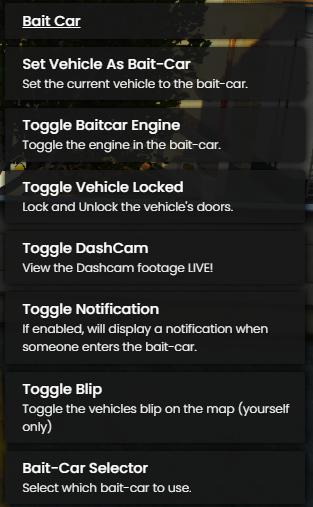 Screenshot 2023-01-22 134550313×507 101 KB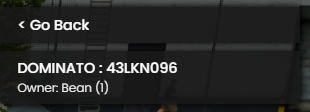
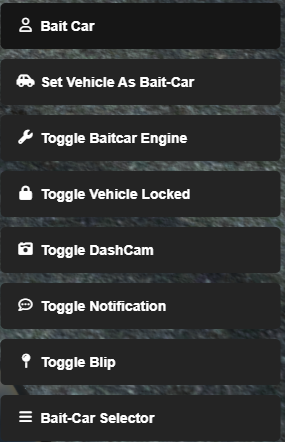
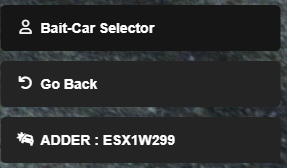
commonmenu.ytd texture)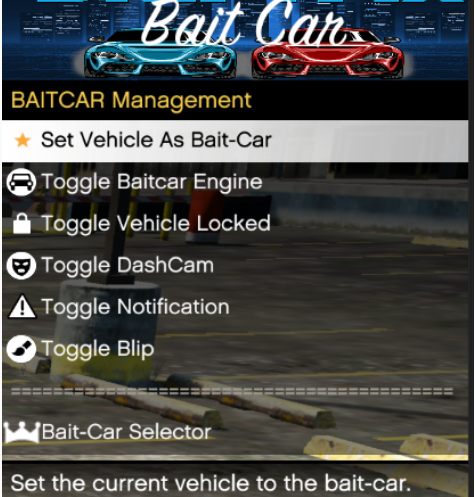
commonmenu.ytd texture)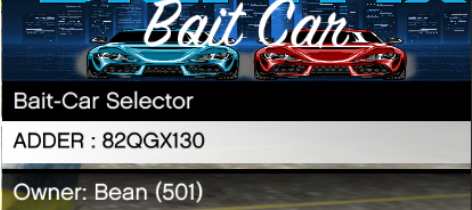
Support & Other WorkYou can find live support on our Discord: https://discord.gg/UwH68aHMPn
Don’t hesitate to report any issues, offer any constructive criticism, or leave a suggestion!
If you have an idea you’d love to see come to life, don’t be afraid to get in touch!
Check out my other work:
[Player Worlds] | [X-Priorities] | [Play-Time] | [Ground]